
Image Processing Pipeline
Image Processing Pipeline
Different images serve different publishing purposes. Their preparation should not become the author's problem.
A photograph used as a Post cover must work in a compact card, a full article header, and a shared link. An image within the article has a different responsibility: it must remain legible, preserve its composition, and adapt to the reading layout. A Page header may need an entirely different crop.
Preparing every version by hand is tedious. Worse, it makes consistent output depend on how much time each author has before pressing Publish.
VerdinCore addresses this with a context-aware image processing pipeline. The application knows the intended role of an uploaded image and prepares a defined set of outputs for that role. Editors make the editorial decision; the system handles much of the repetitive production work.
The image's purpose determines its treatment
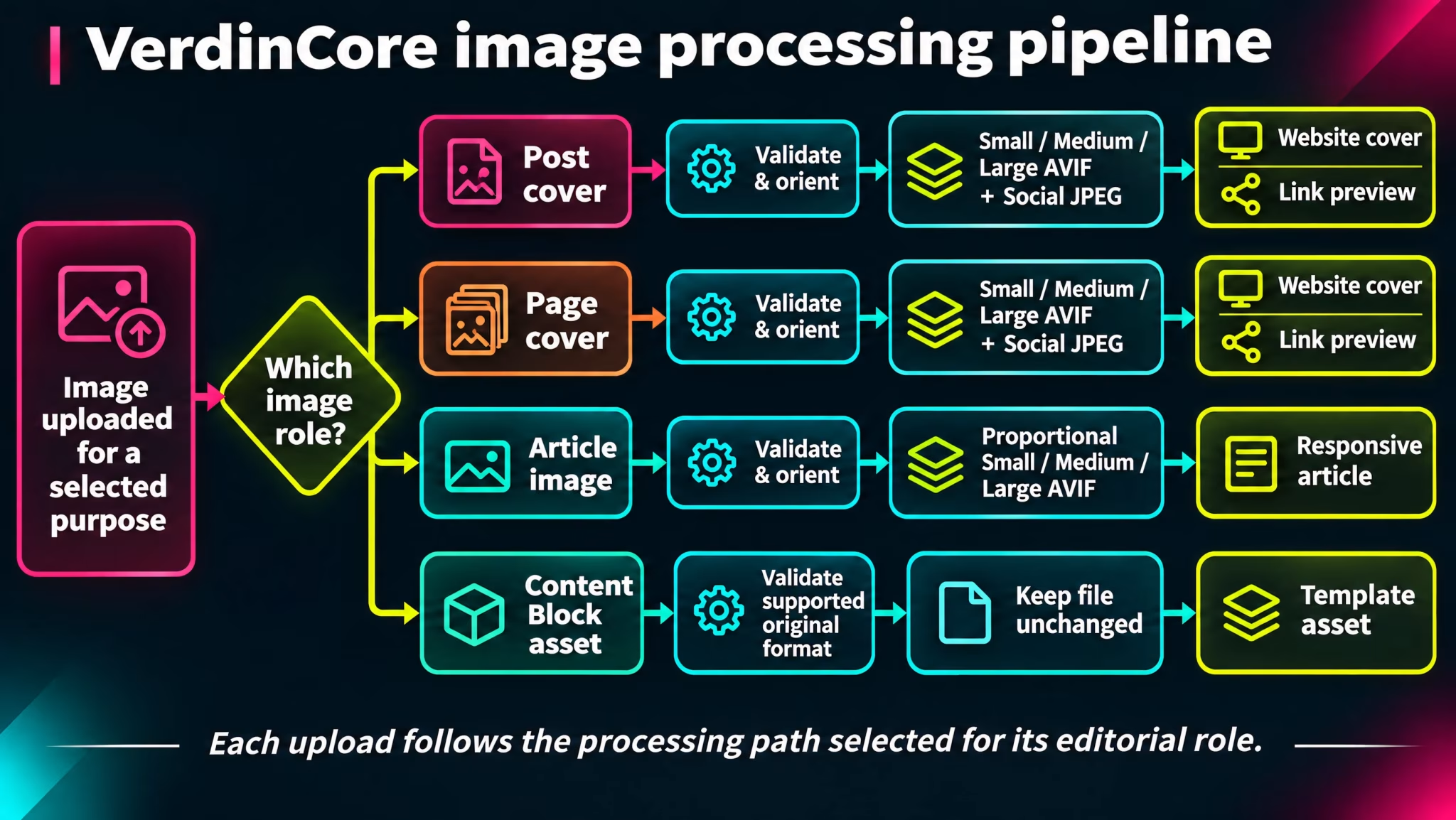
The pipeline does not treat every image as an interchangeable file. It distinguishes between Post featured images, Page featured images, images placed in the content, and images stored in reusable Content Blocks.
Context | Processing approach | Intended result |
|---|---|---|
Post featured image | Three fixed-size AVIF variants and a JPEG sharing image | Consistent covers for Post listings, article views, and shared links |
Page featured image | Its own set of fixed-size AVIF variants and a JPEG sharing image | Page headers with different compositions at different layout sizes |
In-content image | Three proportion-preserving AVIF variants | Images that adapt to reading widths without a forced square crop |
Content Block image | Accepted file stored without resizing or conversion | A supplied visual asset whose format and dimensions are retained |
This is a deliberate separation. A cover image benefits from a predictable frame; an illustration inside an article often depends on keeping the original proportions intact. Applying the same transformation to both would make one of those experiences worse.
From upload to usable assets
For the collections that generate image variants, the processing follows a consistent sequence:
Validate the upload. The application checks that the submitted file is an accepted image and applies upload-size and image-dimension limits.
Correct its orientation. Image processing accounts for orientation information before calculating and producing the outputs.
Apply the appropriate transformation. Featured images are fitted to exact target frames; article images are resized within defined bounds while preserving proportions.
Encode the outputs. Web-oriented variants are generated as AVIF, with dedicated JPEG files for social sharing where applicable.
Register the asset. The system records the uploaded image and its collection so it can be associated with content and inspected through the Media dashboard.
If generation or registration fails, the upload process attempts to remove the partially created files rather than leave an incomplete set behind.
For processed image collections, even the internally retained master is encoded in the configured AVIF format; the source JPEG or PNG is not necessarily kept unchanged. Content Block uploads take the separate original-file path, where the accepted image is stored without conversion.
The processing is part of the upload workflow, not a requirement for the author to run a separate optimization tool after saving the article. It is also not a cloud image-transformation service: the reviewed implementation processes and stores its generated assets as part of the application.
The best automation is often the work an editor never has to notice.
Fixed frames for featured images
Featured images are displayed in recurring components. A Post thumbnail should not unexpectedly change shape from one item to the next, and a Page header must fit its designed space.
VerdinCore therefore creates fixed-dimension outputs for these two contexts.
Variant | Post cover | Page cover |
|---|---|---|
Small | 450 × 253 AVIF | 768 × 896 AVIF |
Medium | 976 × 549 AVIF | 1440 × 960 AVIF |
Large | 1952 × 1098 AVIF | 2560 × 1080 AVIF |
Share | 1200 × 630 JPEG | 1200 × 630 JPEG |
These sizes represent the presets in the reviewed VerdinCore implementation; they are not arbitrary dimensions selected by the editor for each upload.
Why the crop matters
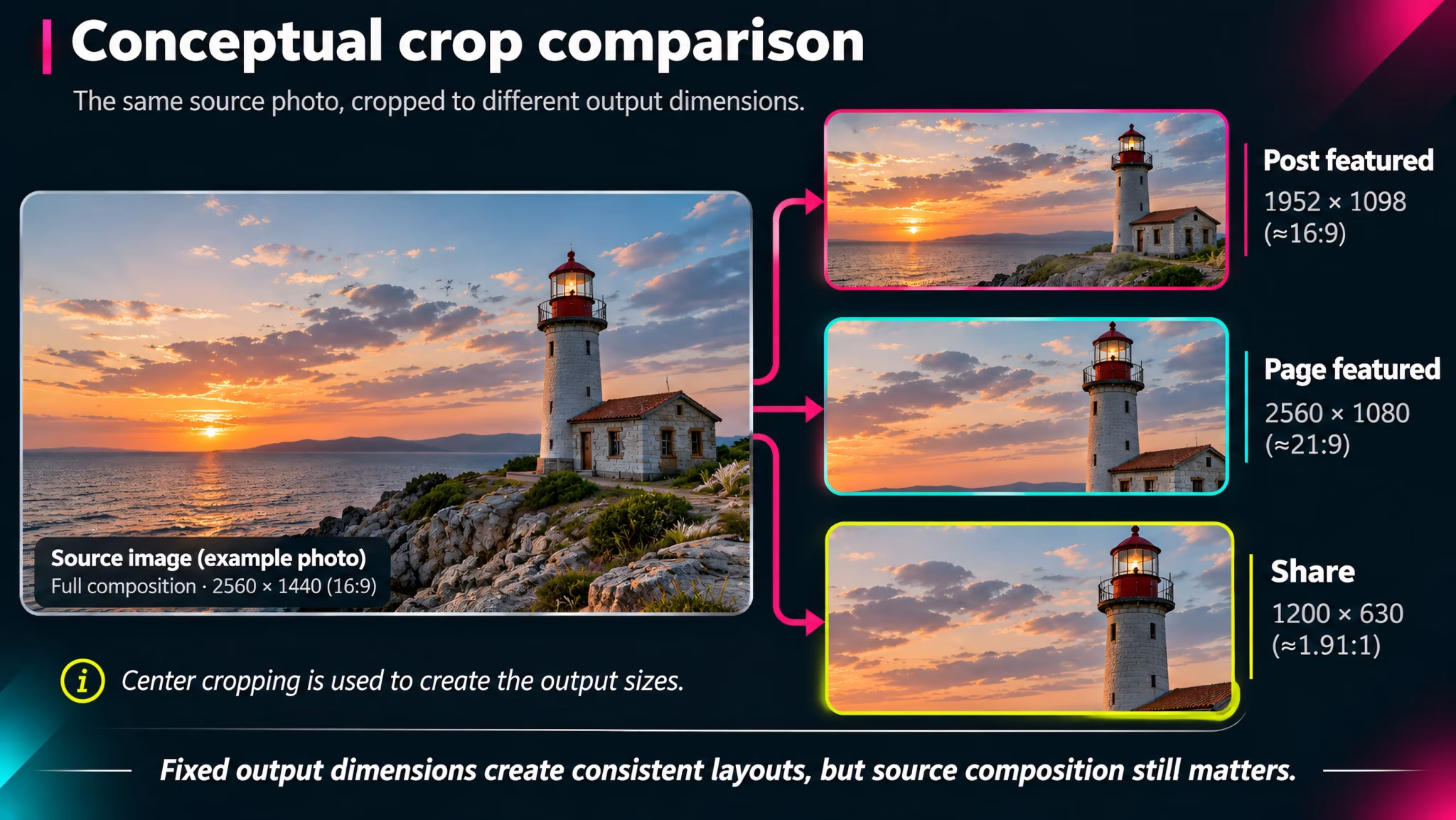
For fixed-frame outputs, the processor fills the target dimensions and crops centrally when necessary. This produces dependable dimensions, but it also introduces a real compositional trade-off.
Consider a photograph with a person standing near the far left edge. The wide Post cover may preserve the subject, while a differently proportioned Page cover may remove part of the scene. The pipeline solves the production task, not the photographer's composition decisions.
For that reason, source images should leave reasonable space around important subjects, especially when the same photograph might be used across several contexts. The current workflow does not expose an interactive focal-point or manual cropping tool; the configured crop is centered.
Preserve proportions inside the article
An image within a Post or Page has a different job. It might be a diagram, a portrait, a chart, or a screenshot. Cropping it automatically could remove information that is essential to the reader.
For content images, VerdinCore creates AVIF versions using these maximum fitting bounds:
Variant | Maximum bounding dimensions | Behavior |
|---|---|---|
Small | 512 × 512 | Fits within the bounds, preserving aspect ratio |
Medium | 1024 × 1024 | Fits within the bounds, preserving aspect ratio |
Large | 2048 × 2048 | Fits within the bounds, preserving aspect ratio |
These are not mandatory square crops. A wide image remains wide; a portrait remains a portrait. The current resizing implementation can also upscale a smaller source to a requested bound, so these presets should not be described as guaranteeing preservation of native source resolution or sharpness.
The visual editor stores managed images with responsive image attributes. The published markup can include srcset and sizes so the browser has multiple available resources for the reading layout. Images inserted through the editor also use lazy loading.
That matters for a simple reason: the HTML can offer different image resources without asking the author to upload and place each one manually. Actual loading behavior and bandwidth savings still depend on the image, the browser, the layout, and the final generated files; we make no blanket performance-score claim.
((Screenshot from a published VerdinCore Post containing a large landscape image with a visible caption inside the article body. Capture the image in its real reading layout at approximately 1440 × 900, including part of the surrounding text so its editorial role is unmistakable. If a separate comparison is possible, additionally capture the same article at approximately 390 px mobile viewport, with the complete image visible and no cropping; these will be presented side by side. Do not include browser developer tools or admin controls. Place after the responsive-image explanation. Suggested caption: "In-content images keep their composition while adapting to the reading layout."))
A separate output for link sharing
The image used on a web page is not always the image that should be supplied to a link-preview service.
For Posts and Pages with featured images, VerdinCore prepares a 1200 × 630 JPEG sharing variant. The metadata layer can then reference it through Open Graph image metadata. When a featured image is absent, the current theme supplies a default sharing image.
This separation avoids relying on a large Page header crop or an article-specific AVIF file as the sole representation of a shared link.
It is important to distinguish providing metadata from controlling a social platform's preview. A social network or messaging service decides whether, when, and how to fetch and display that image. Its caching and rendering rules remain outside VerdinCore's control.
Content Block images follow another rule
Reusable Content Blocks are intended to provide structured values to templates. Their images may be logos, graphics, or other visual assets where retaining the supplied file is more appropriate than producing editorial cover crops.
In the reviewed implementation, the Content Block image collection accepts JPEG, PNG, WebP, AVIF, and SVG and stores these files without automatic resizing or format conversion.
This does not mean that Content Blocks receive the same responsive variants as article images. Their eventual display is determined by the template that uses them.
For how those structured values are managed, see Reusable Content Blocks. For the everyday image workflow inside the editor, see Images & Media.
The pipeline continues after publication
An image can outlive its immediate use. An author may replace a featured photograph, remove a figure from an article, or delete a Content Block. Without any housekeeping, a publishing site can accumulate files that no longer belong to accessible content.
VerdinCore maintains records for its managed images and includes maintenance routines for unreferenced media in the featured, article-content, and Content Block collections. These routines work from the application's references rather than simply deleting files based on their age.
They also respect recoverable content when assessing whether a featured asset is still needed. Cleanup is a maintenance operation, not an immediate deletion guaranteed at the moment an editor removes an image.
This is a small architectural decision with a long operational horizon: managing images involves the whole lifecycle, not only the moment of upload.
What this architecture deliberately does—and does not—promise
The processing pipeline is useful precisely because its responsibilities are defined.
It provides:
Output presets matched to the role of an image.
Fixed cover dimensions and proportion-preserving content variants.
AVIF assets for configured web uses and JPEG sharing variants.
Media records and cleanup routines for longer-term management.
Responsive image markup in the supported public and editor flows.
It is not presented as: a browser-based photo studio, an interactive crop designer, an image CDN, a universal asset-reuse picker, or proof of a particular page-speed score.
Those distinctions do not diminish the pipeline. They explain why the architecture is focused: it takes work that would otherwise be repeated for every article and turns it into a consistent publishing operation.
One upload. Outputs designed for their purpose. Less manual preparation between the image and the published page.
Related reading: Images & Media · Themes & Rendering · SEO & Distribution