
Caching & Performance
Caching & Performance
A fast publishing experience is built through deliberate choices, not a single optimization switch.
A website has two competing responsibilities. It should serve readers promptly, and it should reflect what its editors have published. Caching can reduce repeated work, but an outdated page is not an acceptable trade-off if nobody understands when it will be refreshed.
VerdinCore approaches performance at several levels: server-rendered pages, optional full-page caching for public visitors, prebuilt frontend assets, image variants prepared for their intended use, and selective caching of administrative statistics. These are separate mechanisms with different purposes. Understanding those boundaries is more useful than claiming that every page is automatically cached or every deployment will achieve the same speed.
Performance starts before the cache
VerdinCore's public website is rendered on the server with PHP and CodeIgniter. Content, templates, and reusable components are assembled into pages that the browser can display without relying on a separate client-side application to reconstruct the article.
The frontend build also prepares production assets: Tailwind CSS is compiled and minified, while JavaScript is bundled and minified with esbuild. The media pipeline produces image variants for different editorial contexts, with responsive choices for images inserted into articles.
Layer | What VerdinCore does | Why it matters |
|---|---|---|
Page rendering | Builds public pages from stored content and server-side templates | Keeps the publishing model independent of a client-side page builder |
Full-page cache | Can reuse completed public responses for eligible guest requests | Avoids repeating page generation during the configured cache lifetime |
Frontend assets | Generates bundled, minified production CSS and JavaScript | Reduces the amount of source code shipped directly from development files |
Images | Prepares purpose-specific formats and sizes | Gives layouts suitable assets without manual preparation of every variant |
Dashboard summaries | Reuses computed administration statistics for a defined period in production | Avoids recalculating the same overview figures on every dashboard request |
These optimizations complement one another; they are not interchangeable. A compact stylesheet cannot fix a slow database query, and a cached HTML page cannot compensate for an oversized photograph. Real performance depends on the entire application and the environment in which it runs.
Full-page caching, deliberately scoped
VerdinCore includes a configurable full-page cache built on CodeIgniter's caching facilities. It is disabled in the repository's default configuration and can be enabled for production deployments where its benefits outweigh the need for immediate freshness.
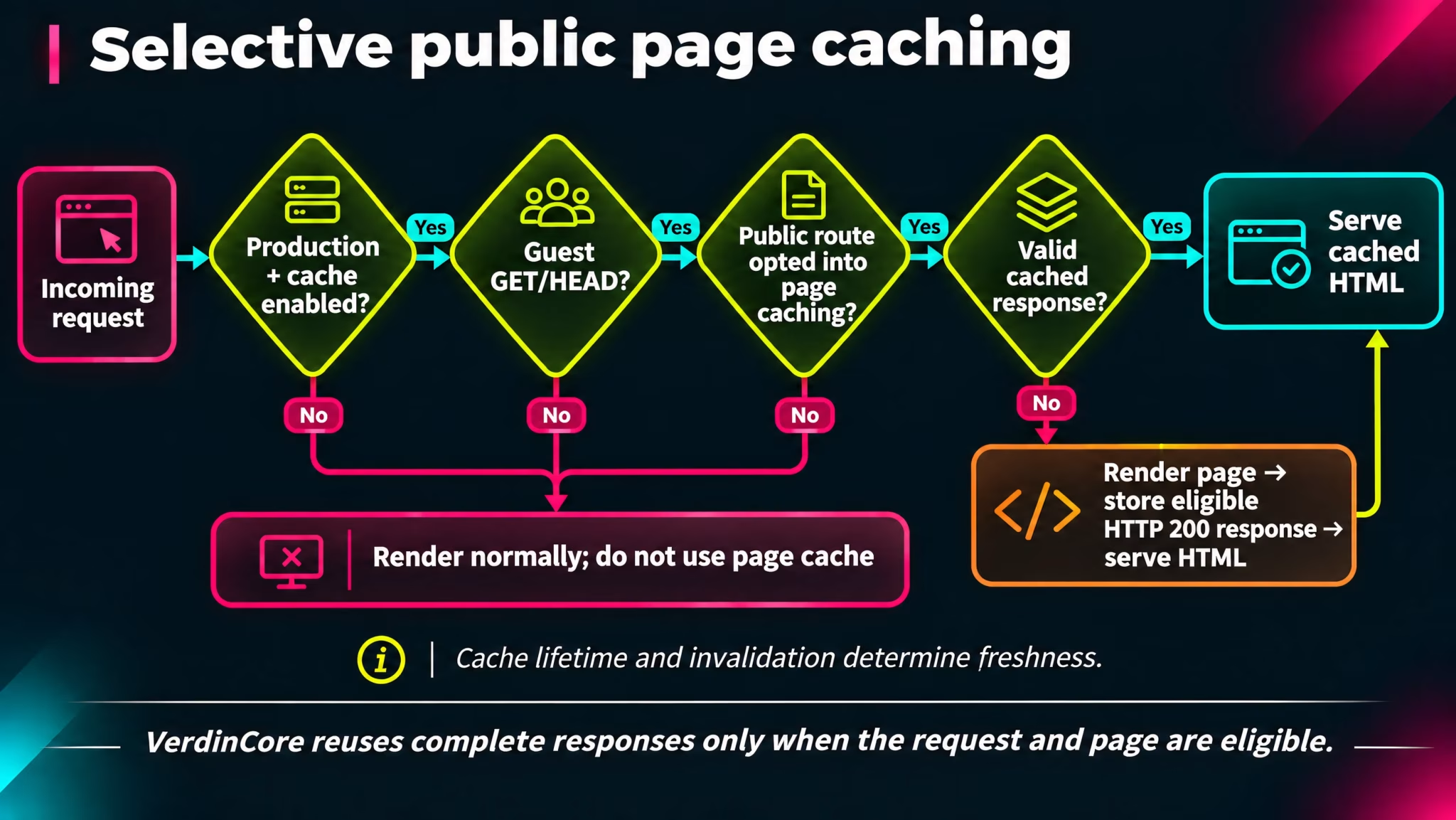
When enabled, page caching applies only under defined conditions:
The application is running in production.
The request uses GET or HEAD and comes from a visitor who is not signed in.
The request is for an eligible public page, not the administration area.
The relevant controller has explicitly opted the response into page caching.
The response is successful: the current cache configuration permits HTTP 200 responses, rather than caching errors by default.
This is not a blanket cache for every route. It is a selective optimization for public reading.
Which pages can benefit?
Public content | Page-cache behavior |
|---|---|
Homepage and blog index | Eligible when full-page caching is enabled |
Individual published Posts and Pages | Eligible when publicly accessible |
Topic and Topic Group listings | Eligible, including their paginated results |
Archive browsing by date | Eligible for non-search archive views |
Archive search results | The controller intentionally does not opt search results into the page cache |
Dashboard and signed-in visits | Excluded from full-page caching |
Pagination and supported archive filters are considered when forming cache entries. This matters because page two of a listing should not receive the cached HTML for page one.
The point is not to cache everything. It is to avoid doing the same public rendering work repeatedly where reuse is appropriate.
Cache lifetime and content freshness
Caching introduces a useful but important distinction: saving new content and refreshing an existing cached response are not necessarily the same event.
VerdinCore exposes a configurable cache lifetime. The reviewed configuration specifies a duration of 3,600 seconds (60 minutes) when the feature is enabled. This is an example of a configured lifetime, not a fixed requirement for every site.
Consider an article that has already been visited and cached. An editor then corrects an important paragraph. The updated article is saved in the database, but an eligible guest may still receive the earlier cached version until that entry expires or the cache is explicitly cleared.
The reviewed implementation provides two ways to address this:
Manual invalidation. An authorized administrator can use Clear Cache from the Dashboard Overview to remove entries held by the configured application cache handler.
Maintenance-triggered invalidation. The scheduled maintenance workflow requests a cache clear when it publishes due content or when optional automatic featuring actually changes featured selections.
A regular manual edit does not, in this reviewed source snapshot, establish an automatic full-page cache purge by itself. That is why the cache policy should match the publication's needs. For fast-moving news or frequently corrected material, a shorter lifetime or disabled page caching may be more appropriate than a long-lived response.
Publishing situation | Practical consideration |
|---|---|
Relatively stable informational pages | A longer lifetime may reduce repeated page generation |
Frequently updated articles or listings | Consider a shorter lifetime and explicit clearing after important edits |
Scheduled releases | Ensure the maintenance runner is configured, and verify its cache-clearing outcome |
Immediate public corrections | Clear the application cache after saving, if page caching is enabled |
Cache clearing is broad rather than a per-article "purge this one URL" interface. It also removes other entries stored in the same configured handler, so the next request may have to rebuild them.
((Screenshot from VerdinCore Admin > Dashboard > Overview: capture the page header with the "Clear Cache" action visible, together with the "Page Cache Duration" statistic if both fit legibly in one composition. If they are too far apart, prioritize a clean crop of the action and add a second detail image for the duration card only if necessary. Show the actual configuration values, not altered numbers or a staged success notification. Hide identifiable usernames, hostnames, private URLs, and unrelated dashboard statistics if present. Target approximately 1500 × 850, with enough interface context to identify Dashboard Overview. Place after the cache-lifetime discussion. Suggested caption: "Administrators can clear the application cache from the Dashboard; the configured page-cache duration is also visible in the overview."))
Keeping authenticated content outside the page cache
Not every page should be shared between visitors. A public response may be suitable for reuse, but an authenticated view can depend on who is signed in and what that person is allowed to see.
VerdinCore's page-cache filter excludes authenticated requests from both cache reads and writes. Public requests also remain subject to content visibility rules, while member-restricted content uses additional response protections to discourage indexing and shared storage.
This separation matters more than a marginal optimization. A cache must respect the same access boundaries as the content it serves. Enabling page caching must not turn a member-only article or an administrative screen into a generic, reusable public response.
For how publishing status, unlisted content, and member access differ, see Visibility & Access.
Dashboard statistics have their own cache
Full-page HTML is not the only expensive result that can be reused. The Dashboard Overview combines figures such as content counts, user statistics, storage information, and other site totals. Repeating those calculations on every visit is not always necessary.
In production, VerdinCore caches its computed dashboard statistics for one hour. Outside production, the service builds those figures directly. This is a separate application-level cache use, not proof that the public page cache is enabled.
The trade-off is straightforward: an overview figure can remain temporarily unchanged even after the underlying content has changed. It is useful as an operational summary, not a guaranteed live counter. An administrator's manual cache clear also clears this stored summary when it uses the same cache handler.
The System Information screen additionally reports details about the configured cache handler and PHP OPcache when available. OPcache is different from VerdinCore's page cache: it concerns compiled PHP code rather than stored HTML responses. Its presence should not be represented as a page-cache hit rate.
Prepared assets and sensible images
Not every performance improvement belongs to the cache configuration.
VerdinCore's production asset build bundles and minifies the CSS and JavaScript used by the public theme and administration interface. Those files are prepared as part of the build process rather than having the browser load unprocessed development modules individually.
Images receive particular attention because they can easily dominate a page's transferred data. The media pipeline generates different output variants for featured images and article content. In-content images can include responsive sources, allowing the browser to select from available sizes according to the layout.
This approach reduces repetitive work for editors and gives themes resources designed for their intended presentation. It does not establish a universal transfer-size reduction, a particular Core Web Vitals score, or a guaranteed loading time on every network. For the actual formats and processing rules, see Image Processing Pipeline.
What performance claims should mean
It is tempting to turn caching, minification, and responsive images into a single statement: "VerdinCore is fast." But measured speed depends on the server, database, traffic, template, media, cache settings, and network.
The reviewed code supports specific architectural statements. It does not, on its own, establish benchmark comparisons against other CMS platforms, a validated concurrent-user capacity, or guaranteed page-load metrics.
The useful operational questions are more concrete:
Is full-page caching enabled for the appropriate type of site?
Does the cache lifetime reflect how frequently content changes?
Can administrators deliberately refresh stale responses?
Are production assets built and image variants being served correctly?
Have actual pages been measured under the intended hosting conditions?
These questions preserve the distinction between capability and measured performance. The former can be explained from the implementation; the latter deserves real deployment data.
Performance without unnecessary surprises
VerdinCore's approach is not to hide every caching decision behind a promise of automatic speed. It provides distinct mechanisms for public page reuse, dashboard summaries, production assets, and image delivery, with explicit conditions and operational controls.
The result is a foundation that can reduce avoidable work while remaining understandable to the people operating the site. Good performance is not simply the ability to serve an old page quickly. It is knowing when reuse helps, when freshness matters more, and how to choose between them.