
Visibility & Access
Visibility & Access
Publishing a piece of content is one decision. Deciding who can read it and where it appears is another.
A public announcement should be easy to find. A page intended for signed-in readers should not be open to anonymous visitors. And sometimes an article needs a working public URL without becoming part of the site's regular catalogue.
VerdinCore separates these needs instead of forcing them into a single "visible or hidden" switch. Publication status, reader access, and content discovery each have a distinct purpose. The result is a publishing model that gives site owners more control without asking editors to learn a complicated permission system for every article.
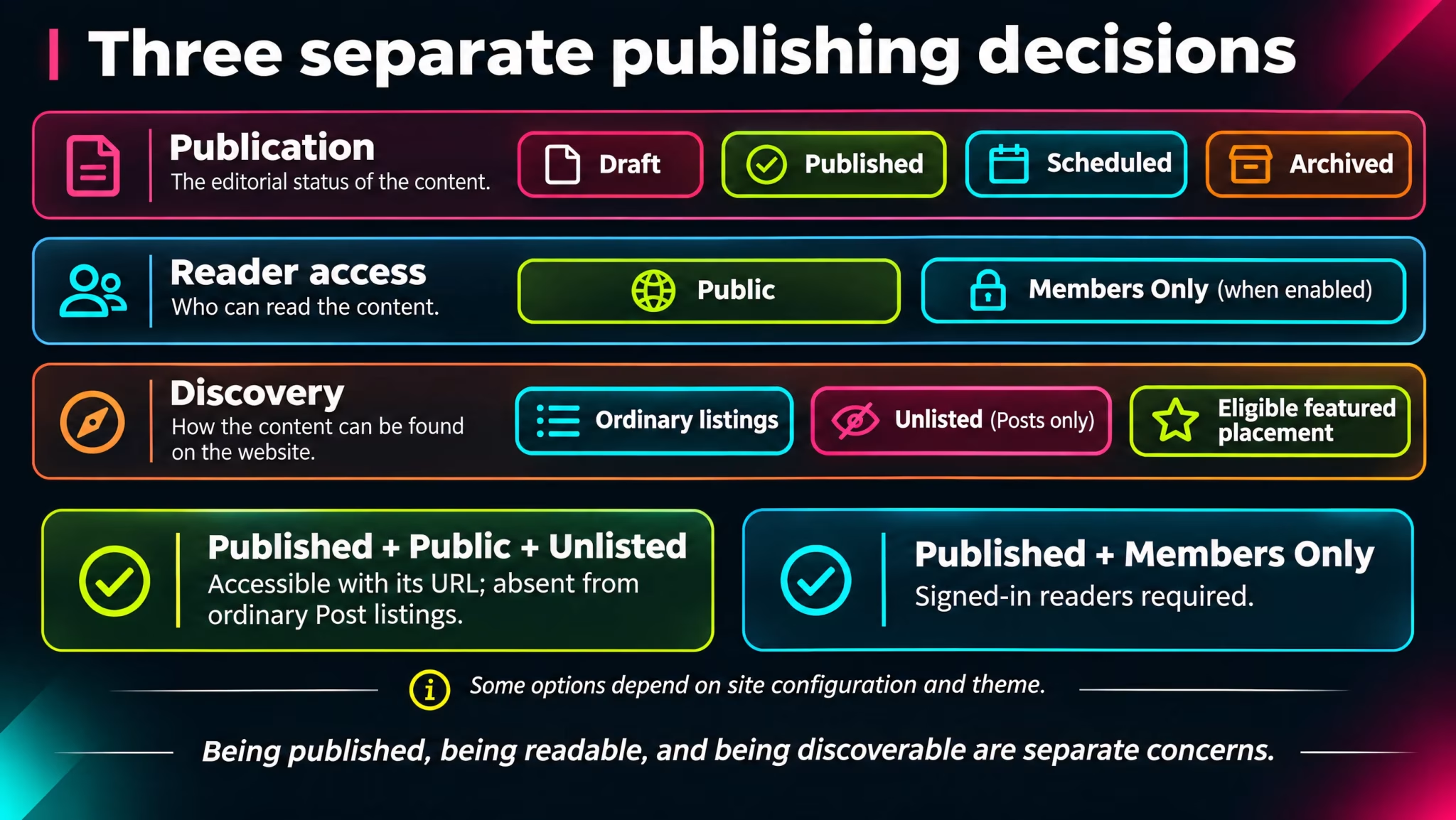
Three decisions, not one
When preparing a Post or Page, it helps to ask three questions in order:
Is it ready to be published? The publication status determines whether the content is live, still a Draft, Scheduled for later, or Archived.
Who should be able to read it? The access level distinguishes content available to everyone from content intended for signed-in users.
Where should readers discover it? Featured placement and, for Posts, the Unlisted option influence how published content appears around the website.
Setting | Answers the question | Applies to |
|---|---|---|
Publication status | Is this content currently published? | Posts and Pages |
Access: Public / Members Only | Can an anonymous visitor read it? | Posts and Pages |
Unlisted | Should this Post appear in ordinary discovery listings? | Posts |
Featured | Should this eligible item be given additional prominence? | Posts and Pages, where the theme supports it |
These controls complement one another. They are not interchangeable: Unlisted does not mean private, and Members Only does not mean unpublished.
((Screenshot from VerdinCore Admin > Edit Post: use a sample Post titled "Release Notes for November"; frame the Status panel, Access dropdown with Public selected, and Discoverability panel with Featured and Unlisted controls visible. Keep the title in view, without exposing real user information. Capture at approximately 1600 × 950. Suggested caption: "Publication status, reader access, and discoverability are separate editorial decisions."))
Public content: made for everyone
Public is the normal access level for a new Post or Page. Once the item is Published, an anonymous visitor can open its URL without signing in.
Whether that item appears on the home page, in a Topic archive, in site navigation, or in a Featured section depends on its content type, discoverability settings, and the active theme. A published public item is eligible for presentation; it is not guaranteed a particular position on every website.
This makes an important distinction possible. A product explanation may be publicly accessible through its permanent Page URL while a publisher decides exactly how prominently to link to it. Conversely, a Post might be designed for regular discovery through topics, the archive, and related-content sections.
Public access is about permission to read, not a promise of placement.
Members Only: restrict reading to signed-in accounts
VerdinCore supports a second content access level, Members Only, for both Posts and Pages. It provides a straightforward distinction between general public material and content reserved for authenticated visitors.
Consider a site that publishes product news for everyone but maintains additional notes for account holders. The news can remain Public while the additional material is marked Members Only. There is no need to create an entirely separate content type merely to establish that distinction.
In the current implementation:
Anonymous visitors cannot open Members Only content through its normal published URL.
A signed-in account can access eligible Members Only content. This is an authentication boundary, not a requirement for a particular paid membership tier.
Member-restricted content is excluded from the public XML sitemap and RSS feed. When served to an authenticated reader, it carries instructions against search indexing and shared HTTP caching.
Public-only promotional placements are kept separate from member-restricted material. Selecting Members Only also disables Featured placement and the special About / Contact Page flags in the editor.
((Screenshot from VerdinCore Admin > Edit Page: open a harmless example Page titled "Member Resources"; show the Access dropdown expanded with Public and Members Only, plus its explanatory text. If practical, show the notice explaining public-only placement restrictions after selecting Members Only. Capture approximately 1500 × 850, keeping the Page title visible. Suggested caption: "A Page can be restricted to authenticated readers without changing its content structure."))
What Members Only is not
The label is deliberately simple, but it should not be mistaken for a full subscription platform. Members Only does not include billing, paid plans, per-customer entitlements, or a separate access rule for every individual account.
In the implementation examined, the reading check uses the visitor's signed-in state. A member account is one way to provide that access, but the access level itself is not a fine-grained role-based paywall.
Account registration is separately configurable and is not enabled by default in the supplied configuration. A site can therefore use authenticated content without automatically offering open public registration.
Pages also respect their parent hierarchy
Pages can live inside a parent-child structure. That structure matters for access as well as navigation.
Suppose a section looks like this:
Resources                       (Public)
└── Member Guides               (Members Only)
    └── Advanced Configuration  (Public)
Even though the last Page is individually marked Public, the complete URL passes through a Members Only parent. VerdinCore checks access restrictions along the Page's ancestry before serving the requested Page to an anonymous visitor.
This prevents a seemingly public child from bypassing a restricted parent merely because someone knows its complete URL. For details on how those relationships are built, see Page Hierarchy.
Unlisted: available by link, absent from normal discovery
Sometimes a Post should be available without being promoted as part of the regular editorial feed. That is what Unlisted is designed for.
A published, Public Post marked Unlisted still has a working direct URL. Someone with that address can open it. However, VerdinCore excludes it from standard Post listings and discovery queries, including regular indexes, Topic views, related-post recommendations, the XML sitemap, and RSS items.
This can be useful for an announcement shared with a particular audience, supplementary material linked from another publication, or a Post that should remain available without competing for placement on the main website.
For example:
/post/release-background-notes
A publisher could share this URL in a newsletter or another article while keeping the Post out of the main catalogue.
((Screenshot from VerdinCore Admin > Edit Post: use a Published sample Post named "Release Background Notes"; frame the Discoverability panel with Unlisted enabled and include the Post title and Status. Capture approximately 1500 × 850. Suggested caption: "Unlisted keeps a published Post reachable by direct link while excluding it from ordinary content discovery."))
Unlisted is a discovery control, not a security control. Anyone who has the URL may be able to read a Public, Unlisted Post. It should never be used for confidential information.
There is another distinction worth keeping in mind: excluding a URL from the sitemap does not guarantee that search engines will never find or index it. The current implementation does not automatically assign a noindex directive solely because a Post is Unlisted. If access must be restricted, use the appropriate access level instead.
The Unlisted setting applies to Posts. Pages use their hierarchy, publication status, access level, and theme-defined navigation behavior rather than an equivalent Unlisted toggle.
Featured and Pending Review do different jobs
Two additional controls often appear near the visibility settings, but neither defines who may read an item.
Featured marks eligible content for additional emphasis where the theme supports a featured-content placement. It is a presentation choice, not a way to publish an unpublished item or grant additional access. Members Only items cannot be manually featured through the normal editor controls. For Posts, an optional automatic featuring process may also manage that flag when configured.
Pending Review marks content for editorial attention. It can help administrators and editors identify material that still needs checking, but it does not create a multi-stage approval workflow. It does not, by itself, convert a Published item into a Draft or prevent an otherwise eligible item from being read.
That separation is intentional. An editorial reminder should not silently become a publication rule, and a promotional flag should not determine confidentiality.
Choose the right combination
The most useful way to understand these settings is through everyday publishing situations.
Editorial intention | Suitable configuration | What to expect |
|---|---|---|
Publish a normal article | Published + Public | Open to all visitors; can appear in ordinary discovery surfaces. |
Keep unfinished material out of public view | Draft | Not served as a published public Post or Page. |
Share a Post through a direct link without listing it | Published + Public + Unlisted | Accessible through its URL; omitted from standard Post discovery. |
Offer material to signed-in readers | Published + Members Only | Readable by authenticated visitors, not anonymous visitors. |
Highlight public material | Published + Public + Featured | Eligible for featured placement, depending on the theme or configured automation. |
Flag something for an editorial check | Pending Review alongside its chosen status | An editorial marker; the publication status and access level still govern visibility. |
These choices are particularly useful on websites that contain more than one kind of content. An editor can publish openly, share selectively, or limit readership without introducing a separate content model for every situation.
Control without confusion
A publishing system should make its rules understandable before an editor presses Save. VerdinCore keeps three concepts distinct: publication, access, and discovery. That makes it easier to express what an item is for and harder to mistake an unlisted link for protected information.
The result is not an elaborate audience-segmentation engine. It is something more focused: a practical set of decisions that cover common editorial needs while preserving the boundaries that matter.
The right content should be available to the right audience, without making every publication a permissions project.
Continue exploring: Publishing Workflows · Page Hierarchy · Topics & Discovery · Users & Permissions