
Publishing Workflows
Publishing Workflows
A piece of content is not finished simply because someone has written it.
It may need another pass before it goes live. It may be ready for a future announcement. It may have been useful for years but no longer belong on the public website. And sometimes a perfectly good article needs to be brought back into the conversation.
VerdinCore treats those situations as part of publishing, not as exceptions to it. Posts and Pages share a clear set of publication states, while additional actions let editors schedule, republish, retire, or recover content without rebuilding it from scratch.
The objective is straightforward: keep the publishing decision in the hands of the publisher.
Four states, four different intentions
Both Posts and Pages support the same four publication states:
Status | What it means | When to use it |
|---|---|---|
Draft | Content is saved but not available as a published public page. | An article in progress, an unfinished product page, or material awaiting a final check. |
Published | Content is eligible to appear on the website, subject to its access settings and the site's presentation. | Material that is ready for readers now. |
Scheduled | Content is prepared for automatic publication at a future UTC date and time. | An announcement or page intended to go live later. |
Archived | Content is retained in the administration area but is no longer served as published content. | Outdated material worth keeping without leaving it publicly available. |
These are not four different editors or four separate kinds of content. They are decisions about where a Post or Page stands in its lifecycle.
A new item starts as a Draft. Its status can be changed from the editor's Status panel and saved explicitly. Published items remain editable; saving changes to an already published item updates the existing content rather than creating a new publication.
((Screenshot from VerdinCore Admin > Edit Post: open a realistic draft named "Introducing the New Documentation"; frame the left-hand Status panel with Draft, Published, Scheduled, and Archived visible in the dropdown, and keep the title and part of the editor in view. Capture at approximately 1600 × 900. Suggested caption: "Publication status is an explicit editorial choice, available directly in the editor."))
From writing to publication
For a typical article, the workflow remains compact:
Create a Post or Page. Add the title, excerpt, body and any relevant media.
Keep it as a Draft. Save work while the content is still being prepared.
Make the publishing decision. Choose Published for an immediate release, or Scheduled for a future date.
Save the change. VerdinCore persists the content and its selected state.
Manage it afterward. Edit the published content, archive it when it is no longer relevant, or move it to Trash if it should be removed from the working collection.
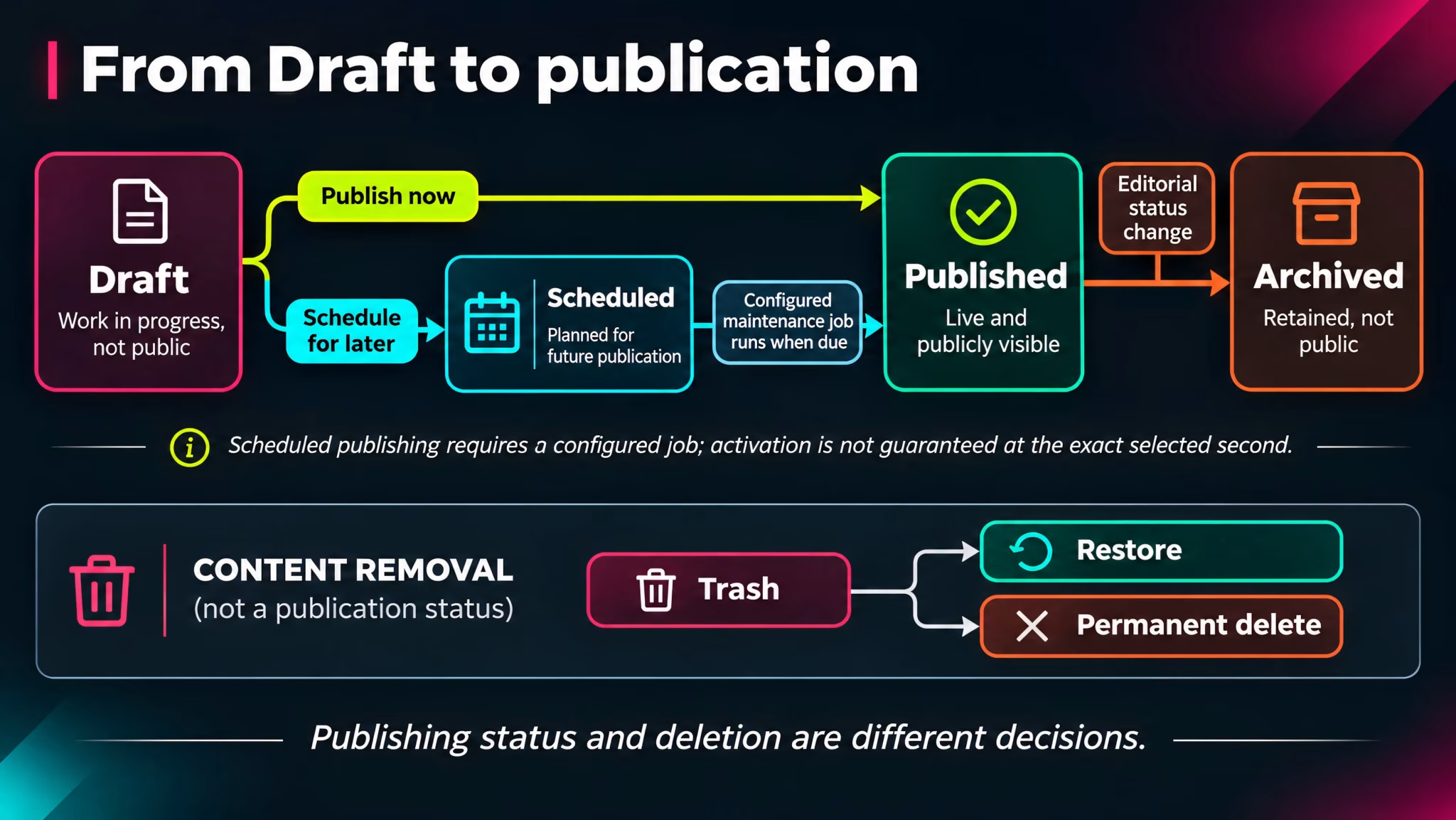
For example, a product release can begin as a Draft while its screenshots and wording are finalized. When the release is ready, its editor can publish it directly or select a future publication date. Six months later, the announcement can remain published, be updated, or be archived according to its continuing value.
Publishing is not a single button press. It is the ability to decide when content becomes visible, how long it stays relevant, and what happens next.
The editor uses an explicit Save action. This is not a claim of automatic saving or a version history: work should be saved deliberately, and the current implementation does not establish a full revision system.
Schedule content for a future day
Not every publication needs someone sitting at the keyboard when it goes live. VerdinCore supports scheduled publication for both Posts and Pages.
Scheduling follows a simple two-stage flow in the current editor:
Select Scheduled and save the new Post or Page.
On the saved item's edit screen, use Scheduled Publishing (UTC) to choose a date and time, then save again.
The current date picker accepts a date from the following UTC day onward. Dates and times are entered in UTC, so editors should account for their local time zone when planning a release.
((Screenshot from VerdinCore Admin > Edit Post: open an already saved Scheduled post; show the Status selector set to Scheduled and the Scheduled Publishing (UTC) date/time field populated with a future date. Keep both panels visible, together with the post title and Save button if practical. Capture at approximately 1600 × 900. Suggested caption: "Posts and Pages can be prepared in advance and assigned a UTC publication time."))
What happens when the scheduled time arrives?
VerdinCore's scheduled maintenance process checks for due Posts and Pages and changes their status to Published. This is handled by a configured cron task; it does not depend on an editor being logged in.
That distinction matters operationally. The content becomes published when the scheduled task runs after its due time, not necessarily at the exact second shown in the date picker. The server must be configured to execute the job reliably. When scheduled content is published, VerdinCore also requests the appropriate cache maintenance through its operational workflow.
For the operational side of scheduled jobs, see Automation & Maintenance.
Keep an article current without starting over
Publishing is rarely the last edit. A Post may need a corrected figure, an updated explanation, or a new link. A Page may change as the product evolves.
VerdinCore allows an existing published Post or Page to be edited and saved in place. There is no need to duplicate an article merely to revise it.
For Posts, there is also a separate Republish now action. It updates the publication date of an already published Post to the current time, so an editor can intentionally give that publication a new date without creating another Post. This is different from simply saving an edit, which does not automatically reset the publication date of an already published item.
Republishing is available for published Posts, not as a general action for Pages or unpublished material.
This is useful when an older article has been substantially refreshed and deserves to be treated as a current publication again. It should be an editorial decision, not a hidden consequence of correcting a typo.
Retire content without confusing archiving and deletion
An article can stop being public without becoming worthless. VerdinCore distinguishes Archived content from content moved to Trash.
Action | What happens | Can it be brought back? |
|---|---|---|
Archive | The item remains in the normal content collection with Archived status and is no longer served as a published item. | Its status can be changed and saved again. |
Move to Trash | The Post or Page is soft-deleted and appears in the administration Trash view. | Yes, authorized users can restore it. |
Delete Permanently | A trashed item is permanently removed. | Not through the normal Trash recovery action. |
Trash offers separate views for deleted Posts and deleted Pages, with Restore and Delete Permanently actions. These actions are permission-controlled, so they are not necessarily available to every editor.
((Screenshot from VerdinCore Admin > Dashboard > Trash: select Posts and show two harmless example items, with their status badges and the Restore / Delete Permanently actions visible. Keep the Content Type filter in frame. Capture at approximately 1600 × 900; exclude real unpublished titles or sensitive data. Suggested caption: "Trash separates recoverable removal from permanent deletion."))
Archive is a useful editorial state. Trash is a recovery mechanism. Neither should be mistaken for a version backup, and permanent deletion should be treated accordingly.
Publication status is only one part of visibility
Published answers one question: is this item in its published state? It does not answer every question about where readers will find it or who may access it.
A Post can also be marked Unlisted, affecting its appearance in normal discovery surfaces without making a direct link private. Posts and Pages carry an access level, which can distinguish public material from member-oriented content where that functionality is enabled. Featured placement and topic classification are additional decisions about presentation and discovery.
There is also a Pending Review marker. It helps identify material requiring attention, but it should not be confused with a multi-step approval engine, with assigned reviewers or automatic sign-off rules.
Keeping these decisions distinct makes the publishing model easier to reason about:
Status determines the lifecycle stage.
Access determines the intended audience.
Discovery controls influence how eligible content is surfaced.
For those distinctions in detail, see Visibility & Access and Topics & Discovery.
An editorial workflow that stays understandable
The same publication may be drafted, scheduled, published, revised, republished, archived and, eventually, removed. VerdinCore gives those actions distinct meanings rather than treating all content as either present or deleted.
This does not require an elaborate approval hierarchy or a workflow designer. It requires a clear set of states, explicit actions, and enough control to respond to the way real websites change over time.
Good publishing software should make it easy to create content, but equally clear what happens to that content afterward.
Continue exploring: Posts & Pages · Visibility & Access · Automation & Maintenance