
SEO & Distribution
SEO & Distribution
Publishing should not end at the Publish button. A page also needs to be understandable when it is found, linked, shared, or read outside the website.
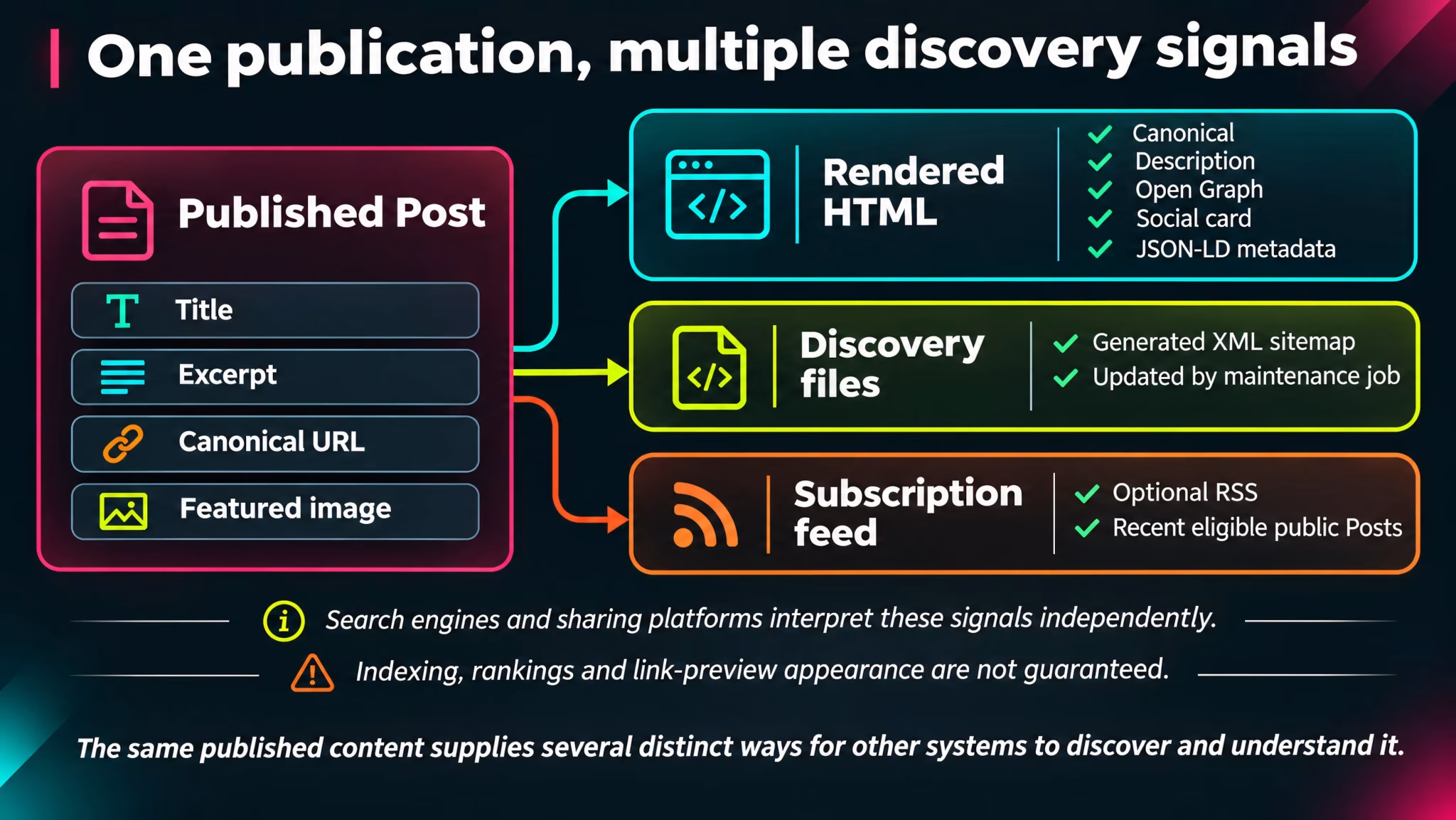
A well-written article can reach its audience through several routes: a search result, a link in a message, a social post, an RSS reader, or a reader exploring the site itself. Each route needs different information. Search engines look for page identity and structure. Social platforms look for a title, description, and image. Feed readers need a reliable stream of new publications.
VerdinCore handles much of this supporting work as part of the publishing system. It generates page metadata, social sharing information, structured data, XML sitemaps, and an optional RSS feed from the content and site configuration already available to it.
This is not a promise of higher search rankings. It is the foundation that helps published content travel with meaningful information attached.
One publication, several ways to understand it
A Post contains more than its visible body. Its title, excerpt, author, publication dates, assigned Topics, featured image, and permanent URL can all contribute to the way the publication is represented outside the article itself.
Rather than requiring an editor to assemble a separate set of HTML tags for every Post, VerdinCore builds the appropriate metadata when the public page is rendered. Pages and archive views receive metadata suited to their own content.
Output | What VerdinCore provides | Why it matters |
|---|---|---|
HTML metadata | Page title, description, author, and robots directive | Gives browsers and crawlers useful page information. |
Canonical URL | A canonical link for the requested page | Identifies the URL the page presents as canonical. |
Open Graph | Title, description, URL, content type, and sharing image | Supplies information that social platforms may use in link previews. |
X / Twitter card metadata | Large-image card information | Supports richer previews on compatible platforms. |
Schema.org JSON-LD | Structured descriptions of supported page types | Provides machine-readable context about the website and content. |
XML sitemap | A generated list of eligible public URLs | Helps crawlers discover published material. |
RSS 2.0 | An optional feed of recent public Posts | Lets readers and external clients follow new publications. |
These are complementary mechanisms, not seven separate chores an editor must perform for each article.
Metadata begins with the content
A descriptive title and a useful excerpt are editorial decisions. VerdinCore uses them as inputs to the generated metadata.
For a Post, the page description comes from its Excerpt. If that field is empty, the system falls back to the site's configured description. The same principle applies to Pages. The public title is taken from the content title, while general site views use the brand's configured identity and description.
This makes the Excerpt worth writing carefully. It should tell someone what the content is about, not merely repeat the title or promise something the article does not deliver.
For example:
Field | Example |
|---|---|
Title | Managing Images in a Content-Heavy Website |
Excerpt | How a publishing workflow can prepare image variants for articles, page covers, and social sharing without repeated manual exports. |
Slug |
|
The title and excerpt can then serve the article itself and its machine-readable presentation. They are not a replacement for strong writing; they make that writing easier to identify.
((Screenshot from VerdinCore Admin > Edit Post: open a harmless Published sample Post named "Managing Images in a Content-Heavy Website"; show the Title and Excerpt fields with complete, realistic copy, plus the Slug control in the sidebar if it fits naturally. Capture approximately 1600 × 900 with legible field labels. Hide account details and any unpublished business information. Suggested caption: "The title and excerpt provide essential information for the article and its generated metadata."))
What actually appears in the page
The generated HTML includes a canonical link, description metadata, Open Graph fields, and social card information. A simplified illustration looks like this:
<meta name="description" content="A practical guide to managing images...">
<link rel="canonical" href="https://example.com/post/managing-images">
<meta property="og:title" content="Managing Images in a Content-Heavy Website">
<meta property="og:image" content="https://example.com/images/featured_post/share/example.jpg">
<meta name="twitter:card" content="summary_large_image">
Illustrative output, not a verbatim extract from a particular live website.
These details usually remain invisible to someone reading the article, but they are an important part of how the page communicates with other software.
There is no separate SEO-scoring dashboard implied here. VerdinCore supplies metadata from its content model; it does not claim to grade an article's chances of ranking in a search engine.
Give shared links a suitable image
A link is often encountered before the article behind it. Its title and image may be the first things a potential reader sees.
VerdinCore's featured-image pipeline produces a 1200 × 630 JPEG sharing image for Posts and Pages with a featured image. The public metadata points to the appropriate sharing variant. If no featured image is available, the system can use a default image supplied by the active theme.
This is separate from the responsive AVIF variants used to display featured images on the website. A cover that looks good in an article card and an image intended for an external link preview have different jobs, so they need not use the same output file.
Image use | Typical output in the implemented pipeline |
|---|---|
Post and Page presentation | Responsive AVIF variants for the site's layouts |
Social sharing | Dedicated 1200 × 630 JPEG |
No featured image | Theme-provided default sharing image |
The practical benefit is straightforward: an editor can choose the featured image as part of publishing, while the application prepares the image format expected by its own metadata output.
((Screenshot from VerdinCore Admin > Edit Post: display a sample Post with a landscape Featured Image selected; frame the image preview and enough of the editor sidebar to establish that it belongs to the current Post. Capture approximately 1500 × 850. Hide private media and account information. Suggested caption: "A Post's featured image also provides the source for its dedicated social sharing image."))
External platforms ultimately control how a link preview is displayed and when their cached information is refreshed. Metadata supports a preview; it cannot guarantee its final appearance.
For the complete image workflow, see Images & Media.
Structured data: describe the page, not just display it
A visible heading tells the reader what a page is about. Structured data gives machines a more explicit description of what kind of page they are looking at and how it relates to the website.
VerdinCore generates Schema.org data using JSON-LD for supported public page types. Its output may include:
WebSite and WebPage information for the site and ordinary pages.
BlogPosting for an individual Post, including relevant dates, author, image, and assigned Topic names when available.
BreadcrumbList for supported content paths.
CollectionPage for Topic and Topic Group archives.
More specific page types for Pages identified as About or Contact.
A configured Person or Organization identity, when the site's brand configuration supplies one.
Consider a Post about server operations. The visible article tells a story in paragraphs and screenshots. Its structured data can additionally describe it as a BlogPosting, identify its author, provide a publication date, and associate it with the website. Those relationships are useful precisely because they do not depend on guessing from the visual layout.
((Screenshot from a public VerdinCore Post in a desktop browser: open View Page Source and use Find to locate application/ld+json; show the Schema.org @context and a readable portion containing BlogPosting, headline, and author. Use a real published sample Post, capture approximately 1500 × 850, and redact any account or internal environment information. Suggested caption: "VerdinCore generates structured content information alongside the visible article."))
Structured data improves the clarity of information supplied to compatible crawlers. It does not guarantee a rich search result, inclusion in a particular search feature, or a ranking improvement. Those decisions remain with the receiving service.
Make eligible URLs discoverable
A growing site may contain Posts, permanent Pages, Topics, and Topic Groups. A crawler should not have to discover every one of those addresses solely by following links from the homepage.
VerdinCore includes a maintenance task that generates an XML sitemap, along with a compressed .gz counterpart. The sitemap starts with the homepage and adds eligible public Pages, Posts, and populated taxonomy destinations.
For Posts, the selection respects publication and discoverability rules: published, Public, non-Unlisted Posts are eligible. Pages are selected from published, Public content, and their hierarchical paths are used to construct URLs. Topic and Topic Group entries are included when they contain eligible public Posts.
Where an item has a usable modification date, the sitemap can include that information as well.
The sitemap works alongside a robots.txt maintenance task, which checks the presence of expected directives and the sitemap reference. The supplied directives permit public crawling while disallowing paths such as the administration and authentication routes.
Two boundaries matter:
The sitemap is generated by a maintenance job. Its freshness depends on when that job runs; publishing an article does not imply that every crawler receives an updated sitemap immediately.
A
robots.txtrule is not an access-control system. Sensitive content still requires proper authentication and authorization.
A sitemap helps with discovery. It is not a command that obliges search engines to index every listed URL.
RSS: a distribution channel without another platform
Not everyone discovers articles through a homepage, social network, or search engine. Some readers prefer an RSS application that gathers new publications from the sources they choose.
VerdinCore supports an optional RSS 2.0 feed at /feed. When enabled, it publishes the most recent eligible Posts, with familiar feed information such as title, link, publication date, author when available, and excerpt. Site configuration controls the number of items and whether to include the full Post content rather than excerpt-only output.
RSS respects the same important boundaries as other public distribution surfaces: it selects Published, Public, non-Unlisted Posts. Members Only material is not distributed through the public feed.
Configuration choice | Effect |
|---|---|
RSS enabled | Makes the |
Items per feed | Limits how many recent eligible Posts are included. |
Include content | Chooses whether eligible items also carry full Post content. |
RSS is disabled in the supplied default configuration. It is a capability a publication can choose to offer, not a feed every VerdinCore installation necessarily exposes.
There is no requirement for a reader to follow the site's social accounts to subscribe through a feed reader. Equally, RSS should not be confused with an email newsletter or an automatic cross-posting integration: those are different distribution mechanisms.
((Screenshot from a public VerdinCore site where RSS has been enabled: open /feed in a browser or an RSS reader and show the channel title with three sample published Post items and their dates. Capture approximately 1400 × 850. Use public sample articles, with no private or member-only material. Suggested caption: "An optional RSS feed gives readers a direct way to follow new public Posts."))
The publisher still makes the important decisions
Automation is valuable when it removes repetitive work, not when it disguises editorial responsibility.
The editor or site owner decides | VerdinCore handles |
|---|---|
What the article says and how accurately it is titled | Generates standard page and social metadata from content fields |
Whether the excerpt is useful | Reuses the excerpt as the content description |
Which featured image fits the publication | Produces dedicated display and sharing image variants |
Whether an item should be Published, Members Only, or Unlisted | Applies the relevant eligibility rules to public discovery outputs |
Whether RSS belongs on the website | Generates and exposes the feed when configured |
How the site's identity should be represented | Uses available brand configuration in website and structured-data output |
For example, Unlisted does not mean private or automatically unindexable. A Public, Unlisted Post remains reachable by direct URL, even though it is excluded from standard listings, the sitemap, and RSS. Members Only content follows separate access rules and receives anti-indexing directives when served to authenticated visitors. See Visibility & Access for those distinctions.
The aim is not to hide every publishing detail from the editor. It is to ensure that ordinary content decisions can support several distribution channels without repeated manual assembly.
Ready to be found, ready to be shared
SEO and distribution are often presented as a collection of tricks. VerdinCore takes a more practical approach: publish meaningful content, describe it consistently, prepare suitable sharing assets, and make eligible material available through established web mechanisms.
Search visibility will still depend on the quality of the content, the site, external search services, and many factors outside the CMS. But the publishing system can do its part, reliably and without turning every new article into a metadata exercise.
Continue exploring: Publishing Workflows · Visibility & Access · Images & Media · Topics & Discovery