
Automation & Maintenance
Automation & Maintenance
Publishing is a visible activity. Keeping a publication in good working order is mostly invisible.
An article can be scheduled for tomorrow. An image can be replaced. A page can disappear from the public site while its old URL remains in a search engine's records. Visitor statistics accumulate, and stored files outlive the content that originally used them.
None of these situations should require an editor to become a system administrator. VerdinCore addresses much of that routine work with a coordinated set of background maintenance tasks, a manual execution option, and a record of what happened during each run.
The aim is practical: let editors focus on publishing, while the system takes care of the repeatable work around it.
One maintenance workflow, several responsibilities
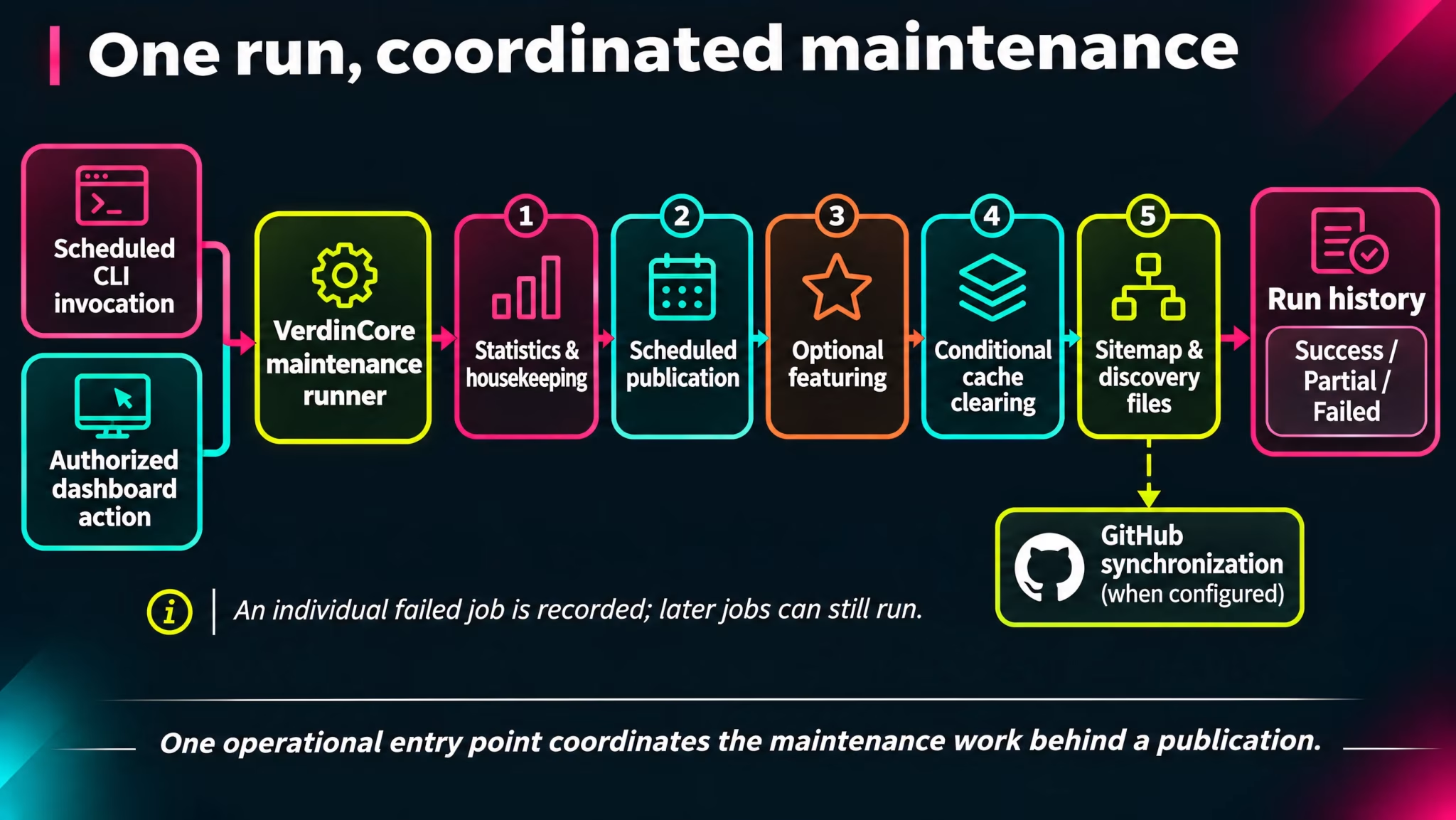
VerdinCore groups its routine jobs under a single maintenance runner. When invoked, the runner processes the configured work in sequence, rather than requiring an administrator to remember and initiate each operation separately.
Area | What the system handles | Why it matters |
|---|---|---|
Scheduled publishing | Publishes due Posts and Pages once their scheduled time has arrived. | Content can be prepared ahead of its public release. |
Statistics | Consolidates completed days of visitor and publishing statistics. | Historical reporting does not depend on keeping every daily visitor record in the active collection. |
Media housekeeping | Looks for unused featured, article-content, and Content Block images and removes eligible files and records. | Storage can follow the actual content rather than indefinitely accumulating abandoned assets. |
Session housekeeping | Removes expired session files when file-based sessions are configured. | Routine cleanup follows the application's session configuration. |
Content discovery | Regenerates the XML sitemap and its compressed version, and checks required | The site's discovery files can reflect its current published content. |
Cache coordination | Clears the configured application cache when supported maintenance operations have changed cache-relevant content. | Publicly visible changes need not remain behind stale cached output. |
Featured content | Can recalculate featured Posts using configured criteria, if automatic featuring is enabled. | Editorial discovery can be supported by a repeatable selection process. |
The runner also supports an optional synchronization of public GitHub repository information when a repository owner has been configured for that deployment. This is a specialized integration, not a prerequisite for running a publication.
Some jobs may find nothing to change. Others run only when a feature is enabled or a particular condition has been met. The presence of a job does not mean every site uses every optional capability.
Scheduled publication: prepared now, released later
Scheduling is most useful when it does not create an extra daily chore.
An editor can prepare a Post or Page, give it a future publication time, and leave it in the Scheduled state. The maintenance process checks for items whose publication time has arrived and changes them to Published.
Consider a publication preparing three announcements for the following week. The writing, images, and scheduling decisions can be completed in one editorial session. Once the maintenance runner is operating on the server, each announcement becomes eligible for publication at its assigned time without another visit to the editor.
There is an important distinction between scheduled and guaranteed to appear at an exact second:
Publication dates are stored and evaluated in UTC.
The current scheduling interface accepts dates from the following UTC day onward.
Content becomes public when a maintenance run processes the due item, so the actual delay depends on how frequently and reliably the server invokes the runner.
This is scheduled publication backed by a server-side job, not an independent real-time timer running inside every article.
For the editor-facing lifecycle and status controls, see Publishing Workflows.
Media cleanup that understands content references
Removing an image from a document and removing the corresponding files from storage are two different operations. VerdinCore's media housekeeping closes part of that gap.
The maintenance tasks examine several kinds of image usage:
Featured images: whether a media entry is still assigned to a Post or Page.
Images within content: whether the media identifier is still referenced by stored Post or Page content.
Content Block images: whether the image remains assigned to a Content Block element.
When a media entry is considered orphaned, the cleanup utility removes its stored files, including generated variants where applicable, and its database record.
A useful detail is that the article-content check also considers soft-deleted Posts and Pages. An image is not automatically treated as disposable merely because its parent article is sitting in the Trash. That distinction matters for a workflow in which deleted content may still be restored.
Storage cleanup should follow the content model, not simply assume that an image has become useless because it is no longer visible on the homepage.
This is orphan cleanup, not an automatic backup service, an asset version history, or a guarantee that every unused file outside the managed media collections will be discovered. For an explanation of the image formats and variants, see Image Processing Pipeline.
Keeping discovery information current
A website changes long after its first page goes live. Posts are published, Pages are moved or updated, and some content stops being eligible for public discovery.
VerdinCore includes maintenance tasks for two familiar discovery files:
XML sitemap: regenerated from the content and taxonomy entries eligible for inclusion, with a compressed
.gzcounterpart.robots.txt: checked for the directives expected by the application and repaired if required rules are missing.
These are separate responsibilities. A sitemap communicates which URLs a site offers for discovery; robots.txt communicates crawling instructions. Neither file guarantees that a search engine will index a page or rank it highly.
The sitemap is refreshed by the maintenance process. It is not necessarily rewritten the instant an editor presses Save. The time between a content change and an updated sitemap therefore depends on when the next maintenance run occurs.
For metadata, canonical URLs, structured data, feeds, and broader search visibility, see SEO & Distribution.
Automatic featuring is a choice, not a requirement
Some publications want editors to decide exactly which Posts receive prominent placement. Others may want that selection to respond to content performance over time.
VerdinCore supports an optional automatic featuring process. When enabled, it evaluates eligible published Posts using a defined score incorporating popularity, viewing activity relative to age, recency, and content depth. Configurable thresholds and a maximum featured proportion constrain the selection.
This is a rule-based mechanism driven by stored content and engagement figures, not an AI recommendation engine. It can help keep featured areas responsive to the publication's activity, but it is not mandatory and it does not replace editorial judgment on sites where manual curation is preferred.
The same principle applies throughout maintenance: automation is valuable when it removes repeated work, not when it takes decisions away without a clear benefit.
A maintenance history you can actually inspect
Background work is more useful when its outcomes are visible. VerdinCore provides a dedicated Cron Jobs screen in the administration dashboard, showing recent runs and their recorded results.
Each run records its trigger, start and finish times, overall status, and the names of jobs that ran, including those that failed.
Run status | Meaning |
|---|---|
Success | All jobs attempted in that run completed without reporting failure. |
Partial | At least one job succeeded and at least one failed. |
Failed | Every job attempted in that run failed. |
A failure in one job does not automatically cancel the remaining jobs. For example, a problem regenerating the sitemap does not, by itself, prevent every later task from being attempted. That gives administrators a more useful picture than a single undifferentiated "cron failed" message.
The history also distinguishes runs started by the command-line scheduler (cli) from those started by an administrator (admin). This is execution history, not an uptime-monitoring service, an automated alerting platform, or a per-job retry queue.
((Screenshot from VerdinCore Admin > Dashboard > Cron Jobs: show the "Cron Jobs" heading, the "Run Cron" button, and the "Cron Runs" table. Include 3–5 representative genuine run records if available, with the "Triggered By", "Status", "Results", "Started", and "Finished" columns legible. Prefer a real mix of CLI and admin runs if such records exist; do not deliberately induce failures or fabricate a Partial status just to create a more dramatic image. Avoid exposing hostnames, internal URLs, environment information, or log details. Capture at approximately 1600 × 900, cropping out unrelated dashboard navigation if necessary but retaining the page context. Place after the status table. Suggested caption: "Maintenance runs are recorded with their trigger, outcome, and individual job results."))
Run the jobs when you need to
Authorized administrators can also select Run Cron from the Cron Jobs screen. This initiates the same coordinated maintenance run immediately and records that it was triggered from the dashboard.
That is useful after a deliberate content or configuration change, or when checking whether the configured jobs can complete successfully. The control is not a collection of separate buttons for individual jobs: it invokes the maintenance workflow as a whole. An administrator should use it with that scope in mind, especially on a live site.
The system also exposes permission-restricted administrative views for system information and application error logs. Those help with diagnosis, although they are not a substitute for server monitoring, infrastructure backups, or a tested recovery plan.
Automation still needs an operating environment
A scheduled task is only automatic when something actually schedules it.
VerdinCore provides a CLI-only maintenance entry point that can be invoked by the server's scheduler. The repository implements the job runner and its recording mechanism; the server's invocation schedule, permissions, and operational reliability are deployment responsibilities.
This matters in practice:
VerdinCore provides | The operating environment must provide |
|---|---|
Coordinated maintenance jobs | A configured scheduler that invokes them |
Due-content publication logic | A reliable execution cadence appropriate to publishing expectations |
Sitemap and media maintenance | Required filesystem permissions and available resources |
Recorded run results | Operational review and action when failures appear |
It is equally important to define the boundaries. This workflow does not establish automated database backups, off-site storage, application upgrades, infrastructure health checks, or guaranteed recovery after an outage. Those deserve their own operational decisions rather than being implied by a "maintenance" label.
Less routine work, more attention for the work that matters
A CMS is not finished when it saves a document. Running a real publication also means dealing with scheduled releases, stored assets, discovery files, accumulated statistics, and the occasional failed job.
VerdinCore brings these responsibilities into a coordinated, inspectable workflow. The individual tasks are not the selling point on their own. The benefit is that everyday publishing has fewer loose ends, while administrators retain a clear view of the work taking place behind the scenes.
That is the kind of automation worth building: not more machinery for its own sake, but less repetitive responsibility for the people using the product.